Self Storage SEO: How to Get Your Facility Found on Google (2026 Guide)
Quick answer
Self storage SEO is the work of getting your facility found when renters search Google for storage near them. It happens in two places: the map pack, which runs on your Google Business Profile, and the organic results, which run on your website. Win both with a complete, accurate profile, a page for each facility and unit type, SelfStorage schema, steady reviews, consistent listings and local links. Then measure calls and move-ins, not just rankings.
Self storage SEO decides whether the renter who types “storage units near me” calls you or the facility down the road. Renters search, compare the few facilities Google shows on the map, check prices and reviews, then call or rent online. If you aren’t on that short list, you don’t get the call.
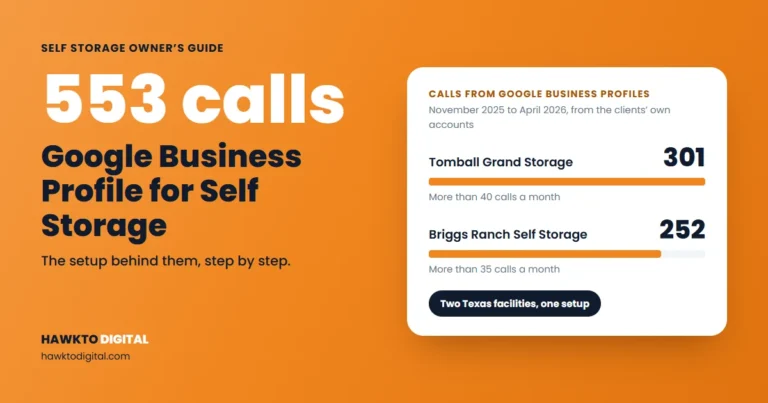
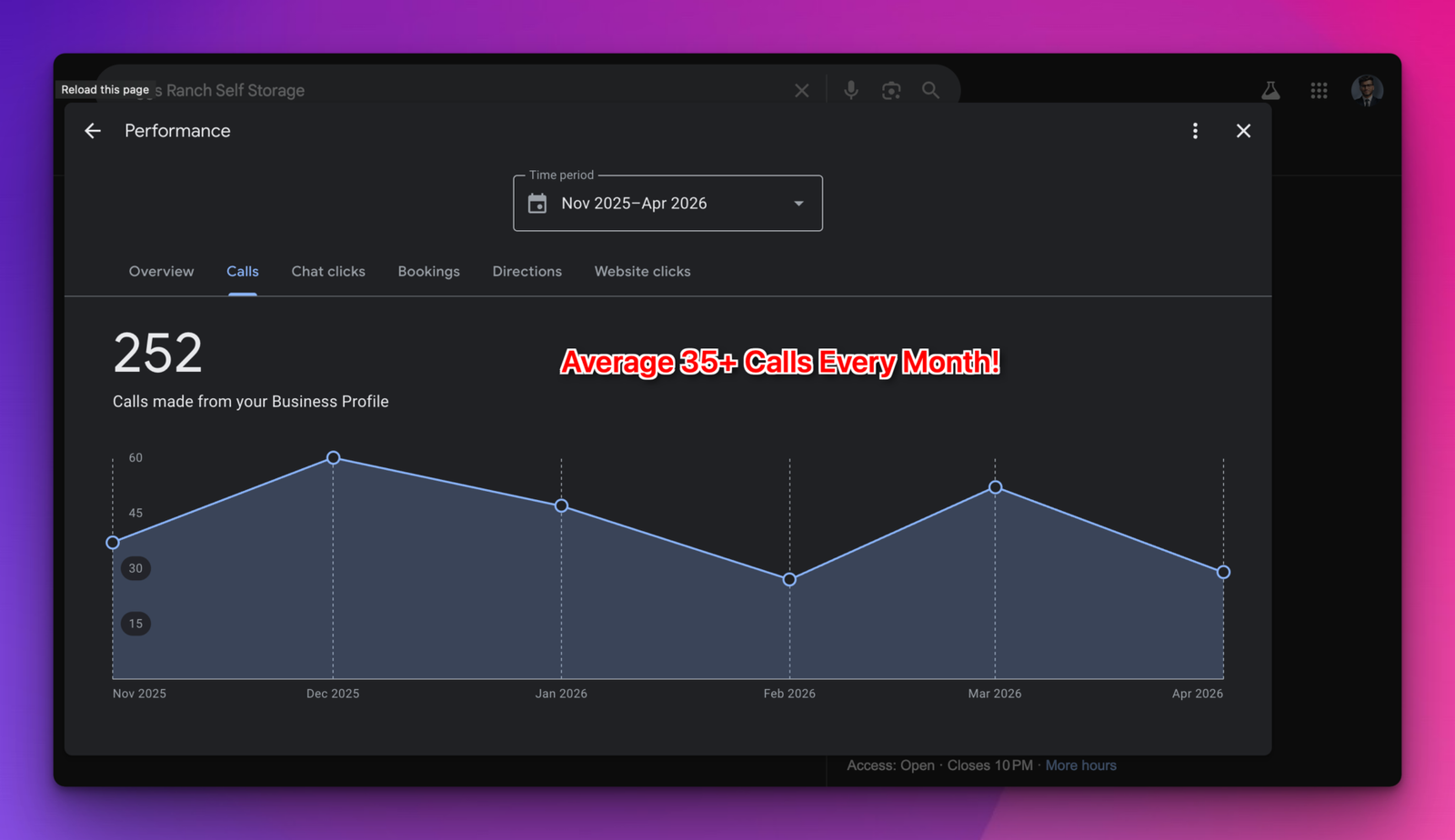
I’m Mehedi Hasan, and I handle Google Business Profiles, websites and social media for facilities managed by Joules Storage Management in Texas. After a full Google Business Profile optimization, Briggs Ranch Self Storage got 252 calls from its profile from November 2025 to April 2026. The screenshot is below, with two more.
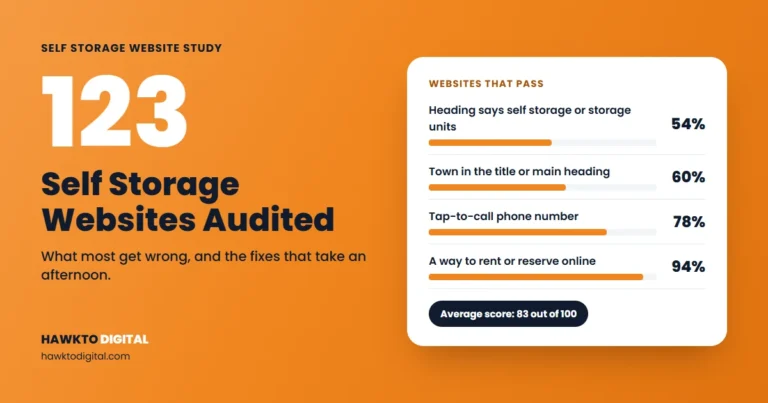
This is the plan I use, written for owners, managers and management companies, with numbers from my study of 123 independent self storage websites in 14 US states. For a quick read on your own site before you start, try my free self storage SEO audit tool.
In this guide
For storage owners and managers
Want this done for your facility?
I market self storage facilities in Texas, including Briggs Ranch Self Storage, which got 252 calls from its Google Business Profile in 6 months. See how I can help with self storage marketing.
See self storage marketing servicesScore your facility website free
How storage renters search
Storage searches are local by nature. The renter wants a unit close to home, work or the place they’re moving to, often this week. Beyond the place, their searches fall into a few patterns:
| Search type | Examples | Where it should land |
|---|---|---|
| Near me and town | storage units near me, self storage [town] | Google Business Profile, home or location page |
| Unit size | 10×10 storage unit near me, 5×10 storage [town] | Unit sizes and prices page |
| Climate control | climate controlled storage [town] | Climate-controlled units page |
| Vehicle storage | boat storage [town], rv storage near me | Vehicle storage page |
| Price and deals | cheap storage units [town], first month free storage | Rates and specials page |
You don’t need to write “near me” on your pages. Google ranks local results on relevance, distance and prominence (Google). Distance is fixed. Relevance comes from your profile and pages matching the search, and prominence comes partly from your reviews and the sites that link to you. Those are the parts SEO can move.
This week: search your five most important terms on your phone, from your office and from the next town over. Note the three facilities in the map results each time. That’s your real competition.
The two places your facility shows up on Google
1. The map pack: your Google Business Profile
For most “storage units near me” searches, Google shows a map with a few facilities above the website links. Those listings come from Google Business Profiles, and a renter can call or get directions without ever visiting a website. That makes your profile one of the first things to get right (step 5 below).
2. The organic results: your website
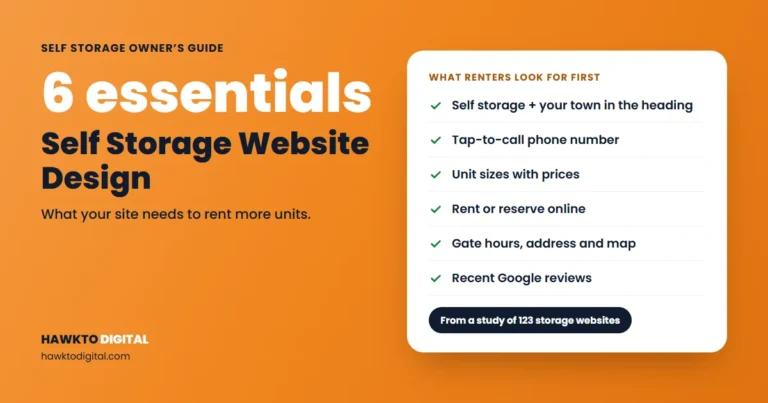
Below the map sit the regular results, where many unit-size and climate-control searches are won. Your website also has to close the rental when renters tap through from your profile. My self storage website design guide covers the pages and layout.
A 9-step self storage SEO plan
The first four steps set up your website, the next four build trust with Google, and the last tells you whether it’s paying off.
Step 1: Map keywords to pages
Give each page one main topic. A home page can’t rank for 10×10 units, climate control and boat storage all at once. Here’s the map I start with:
| Page | Example title tag |
|---|---|
| Home or location page | Self Storage in [Town], [State] | [Facility Name] |
| Unit sizes page | Storage Unit Sizes and Prices in [Town] | [Facility Name] |
| Climate-controlled page | Climate-Controlled Storage Units in [Town], [State] |
| Vehicle storage page | Boat and RV Storage in [Town] | [Facility Name] |
| Nearby town page | Storage Units Near [Nearby Town], [X] Minutes Away |
| Google Business Profile | Your real name only. Keywords go in the description, services and posts. |
Only build pages for units you actually have.
Step 2: Build a page for each location
If you run more than one facility, each needs its own page and its own Google Business Profile. Google’s guidelines say not to create more than one profile for each location (Google). One facility, one profile, one page.
Give each location page its own address, phone, hours, unit prices, directions, photos and reviews, and link that facility’s profile to it.
Be careful with pages for towns where you have no facility. Google’s spam policies list “pages targeted at specific regions or cities that funnel users to one page” as doorway abuse, and “blocks of text that list cities and regions” as keyword stuffing (Google Search Central). Build a nearby-town page only when you have something specific to say, like the drive time and route.
Step 3: Get the on-page basics right
Of the 123 sites in my study, only 54% had a main heading that says self storage or storage units, and 60% named their town in the title or main heading. 78% had a tap-to-call link, but 16% showed a phone number that couldn’t be tapped. The good news: 94% had a way to rent or reserve online.
- Title tag and H1: “self storage” or “storage units” plus your town.
- Phone: a tap-to-call link in the header on every page.
- Prices: sizes with prices or “from” prices, next to a rent-online button.
- Hours and address: office hours, gate hours and the full address in text, not only in an image.
The website design guide goes page by page if your site needs more than a tune-up.
How does your facility website score?
Run your site through my free self storage audit tool to see how it scores and which fixes to make first.
Step 4: Add SelfStorage schema
Schema markup tells search engines the facts about your business in code. Schema.org has a dedicated type, SelfStorage, defined as “a self-storage facility” and sitting under LocalBusiness. Google says to “use the most specific LocalBusiness sub-type possible”, requires a name and address, and recommends properties such as telephone, url, geo, openingHoursSpecification and priceRange (Google Search Central). In my study, 41% of facility sites had no business schema at all. A basic block looks like this:
{
  "@context": "https://schema.org",
  "@type": "SelfStorage",
  "name": "[Facility Name]",
  "url": "https://example.com/locations/[town]/",
  "telephone": "+1-000-000-0000",
  "priceRange": "$$",
  "address": {
    "@type": "PostalAddress",
    "streetAddress": "[Street]",
    "addressLocality": "[Town]",
    "addressRegion": "[State]",
    "postalCode": "[ZIP]",
    "addressCountry": "US"
  },
  "geo": { "@type": "GeoCoordinates", "latitude": 0.0, "longitude": 0.0 },
  "openingHoursSpecification": [{
    "@type": "OpeningHoursSpecification",
    "dayOfWeek": ["Monday","Tuesday","Wednesday","Thursday","Friday"],
    "opens": "09:00",
    "closes": "18:00"
  }]
}
Add it in a <script type="application/ld+json"> tag, one block per location page, matching the page and your Google profile exactly. Skip star-rating markup for your own reviews: Google recommends review properties only for sites that collect reviews about other local businesses. Then test the page in Google’s Rich Results Test.
Step 5: Complete your Google Business Profile
Your profile name must match your real-world name. Google says adding unnecessary information “isn’t permitted” and “could result in the suspension of your Business Profile” (Google). Choose the most specific primary category, and add only a few additional ones (Google). Google also says businesses with complete and accurate information are more likely to show up in local results (Google).
For a storage facility, that means accurate office and holiday hours, unit types listed as services, real photos of each unit type and the gate, and a link to the right location page. I walk through the full optimization here:
The storage-specific details are in my Google Business Profile guide for self storage. For the wider picture, see how to rank higher on Google Maps.
Step 6: Earn and answer reviews
Google says more reviews and positive ratings can help your local ranking (Google). Reviews also sell the unit, because renters are trusting you with their belongings. Yet only 46% of the sites in my study showed customer reviews on the homepage, and on 27% I found none anywhere.
- Ask at the right moment: right after a smooth move-in, or when a manager has solved a problem.
- Make it easy: Google suggests a review link or QR code (Google). Put it in the move-in email and on the office counter.
- Never reward reviews: Google calls incentives like free or discounted services in exchange for reviews “strictly prohibited”. A free lock counts.
- Reply to every review, good and bad, and show a few of the best on your location pages.
Step 7: Keep your name, address and phone consistent
Your facility probably also appears on directories such as Apple Business Connect, Bing Places, Facebook, Yelp and storage marketplaces. Each one should show the same name, address, phone and website as your Google profile.
This week: search Google for your facility name, then for any old phone number or pre-rebrand name. Fix or claim every listing with outdated details.
Step 8: Earn local links
Prominence is partly based on how many websites link to your business (Google). The best links for a storage facility are local and real:
- Your chamber of commerce and local business groups.
- Youth sports teams, school events and charities you sponsor or host drives for.
- Moving companies, real estate agents and apartment communities you already work with.
- A useful local guide on your own site, such as a moving checklist for your town.
Step 9: Track calls, rentals and move-ins
- Google Business Profile performance: calls (taps on your call button), website clicks, direction requests and the search terms people used to find you (Google).
- Google Search Console: the queries that bring people to your site, with impressions, clicks and position (Google).
- Website analytics: count phone taps and completed online rentals as goals.
- Your management software: record how each new tenant found you at move-in.
Review these once a month, location by location.
Real results from Texas facilities
These screenshots come from my clients’ own accounts. Every market is different, so treat them as examples, not promises.
Briggs Ranch Self Storage: 252 calls in six months
Briggs Ranch Self Storage in Texas is managed by Joules Storage Management. After a full Google Business Profile optimization, it got 252 calls from its Google Business Profile from November 2025 to April 2026, an average of more than 35 calls a month.
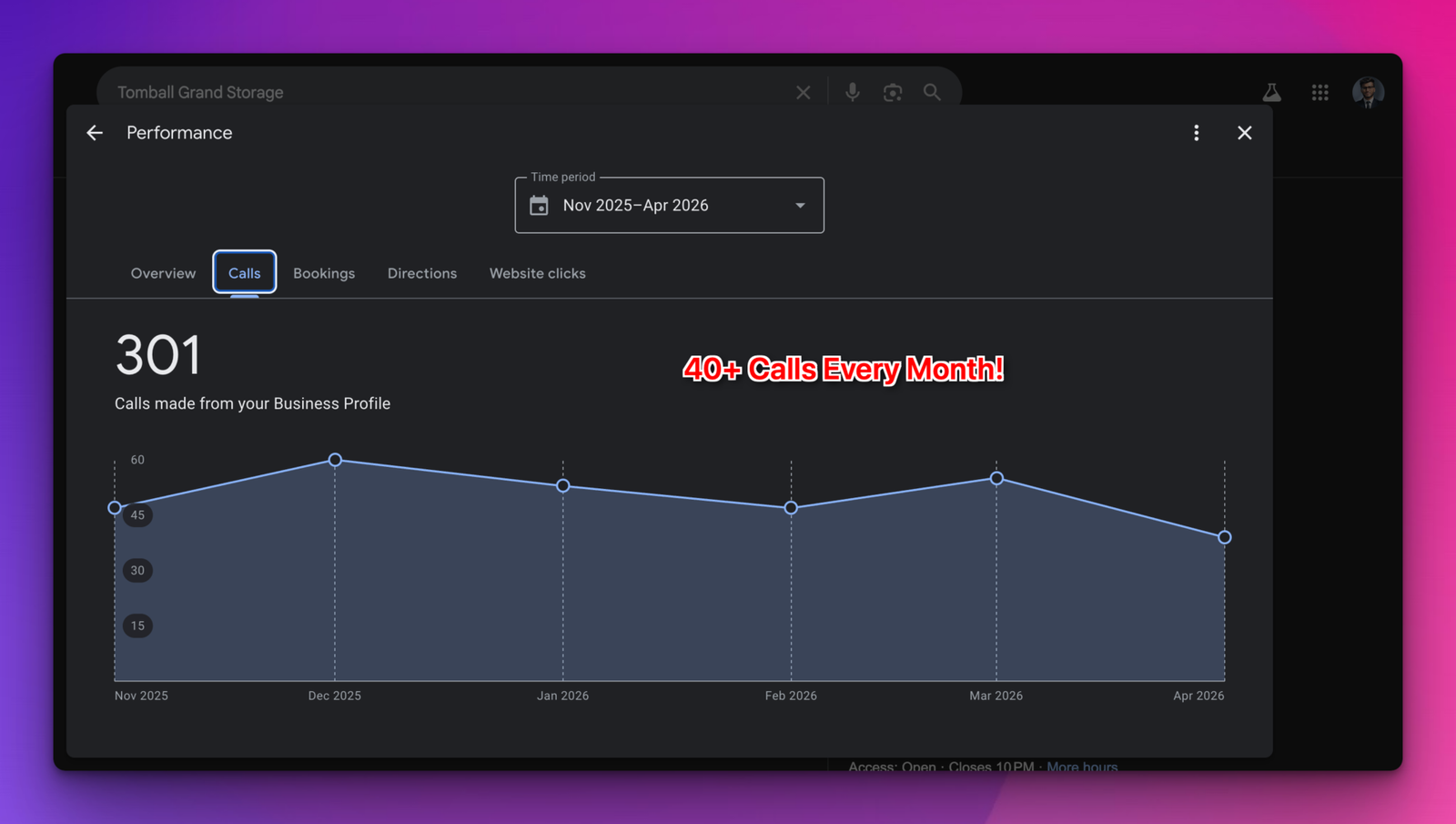
Tomball Grand Storage: 301 calls in six months
Tomball Grand Storage in Texas got 301 calls from its Google Business Profile from November 2025 to April 2026, more than 40 a month.
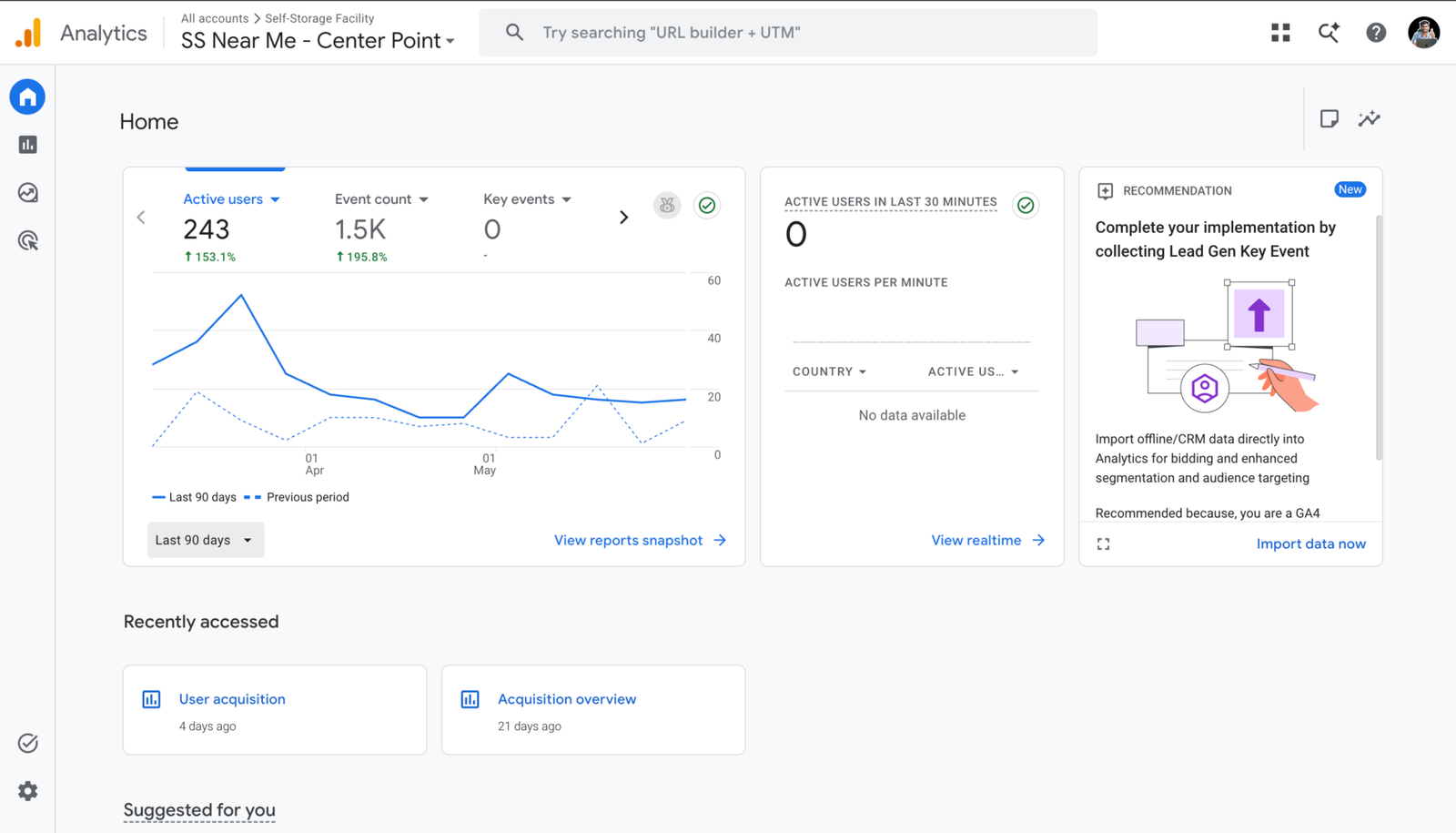
A facility website: 153.1% more users
Google Analytics for another self storage facility’s website shows 243 active users over the last 90 days, up 153.1% on the previous 90 days.
7 common mistakes
- Keywords or a town in your Google profile name. It breaks Google’s guidelines and risks suspension.
- One page for everything. Unit sizes, climate control and vehicle storage each need their own page.
- Cloned town pages. Swapping the town name on the same text is doorway abuse.
- A phone number renters can’t tap. 16% of the sites in my study had one.
- Every location’s profile pointing to the home page. Send each to its own location page.
- Offering a perk for reviews. Google prohibits it.
- Watching rankings instead of move-ins. A top spot that brings no calls isn’t worth much.
How long it takes and what it costs
There’s no fixed timeline. It depends on your competition, your site and how many locations you run. Some fixes help as soon as renters see them, like correct hours or a phone number that can be tapped. Ranking for competitive town and unit-size searches takes months, because pages, reviews and links build up over time.
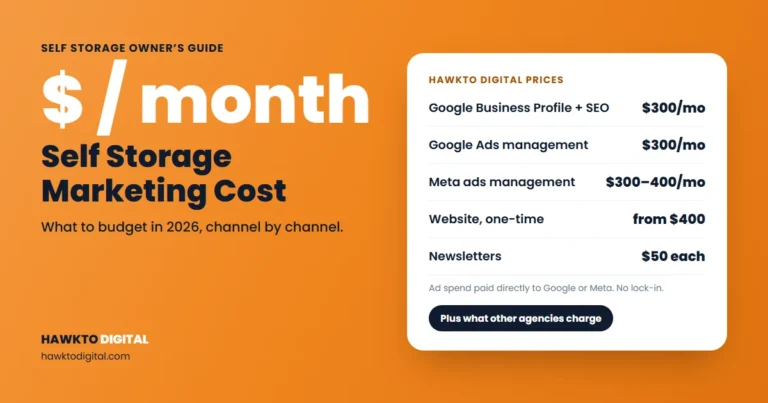
Cost depends on the number of facilities, whether the website needs a rebuild, and how much ongoing work you want on reviews, posts and links. My guide to local SEO cost explains what drives the price, and Hawkto Digital’s packages are on the pricing page. If you need rentals while SEO builds, Google Ads can fill the gap.
DIY or hire a self storage SEO company
DIY works well when you run one or two facilities, can edit your own website and have a few hours a month.
Hiring makes sense when you manage several locations, your site needs a rebuild, or your managers don’t have time for reviews and listings. Whoever you hire, ask them:
- Can you show Google Business Profile call data from storage clients?
- Will I own my Google profile, website and analytics accounts?
- Will you report calls and move-ins, or only rankings?
Walk away from anyone who guarantees rankings or wants keywords in your profile name. For help, see my self storage marketing services, or read my self storage marketing ideas for what to do beyond SEO.
Self storage SEO FAQ
Free tool: where do you rank on Google Maps?
See whether your facility makes the map top 3 from five spots around you, and what to fix first, with the free Google Maps rank checker.
Frequently asked questions
Answers to what storage owners and managers ask most about getting found on Google.
QHow do I get my storage facility on Google Maps?
Claim and verify your Google Business Profile, use your real business name, pick the most specific primary category, and fill in hours, services, photos and your website link. Then keep earning and replying to reviews.
QDo I need a separate page for each storage location?
Yes. Each facility should have its own page with its own address, phone, hours, units, photos and reviews, and its own Google Business Profile that links to that page.
QCan I add “storage units” or my city to my Google Business Profile name?
Only if it’s part of your real-world business name. Google’s guidelines say adding unnecessary information to your name isn’t permitted and could get your profile suspended. Put keywords in your description, services and posts instead.
QHow long does self storage SEO take to work?
It depends on your competition, your website and how many locations you run. Fixing your profile and obvious website problems can help quickly, while ranking for competitive town and unit-size searches usually takes months of steady work.
QShould I use SelfStorage schema or LocalBusiness schema?
Use SelfStorage. It’s a schema.org subtype of LocalBusiness, and Google’s documentation says to use the most specific LocalBusiness subtype possible. Add one block per location page, with the same name, address and phone as your Google profile.
QShould I hire a self storage SEO company or do it myself?
If you run one or two facilities and can edit your website, you can handle the basics yourself. Hiring makes more sense for multi-site operators, sites that need a rebuild, or tough local competition. Avoid anyone who guarantees rankings.
Sources
Sources
Checked in November 2026.
- Google Business Profile Help, Tips to improve your local ranking on Google
- Google Business Profile Help, Guidelines for representing your business on Google
- Google Business Profile Help, Manage your business category
- Google Business Profile Help, Tips to get more reviews
- Google Business Profile Help, Understand your Business Profile performance
- Google Search Central, Spam policies for Google web search
- Google Search Central, Local business (LocalBusiness) structured data
- Schema.org, SelfStorage
- Google Search Console, About
See where your facility stands on Google
Score your facility website with my free self storage SEO audit, then fix the gaps that matter most. If you’d rather hand it off, I handle Google profiles and websites for storage facilities.
Score my facility websiteSee self storage marketing services

About the author
Mehedi Hasan is the founder of Hawkto Digital and is Google, HubSpot and Semrush certified. He markets self-storage facilities and RV parks for operators in the US, covering Google Business Profiles, local SEO, Google Ads, websites, social media and email. Read his story or see pricing.