Self Storage Website Design: What Your Site Needs to Rent More Units
Quick answer
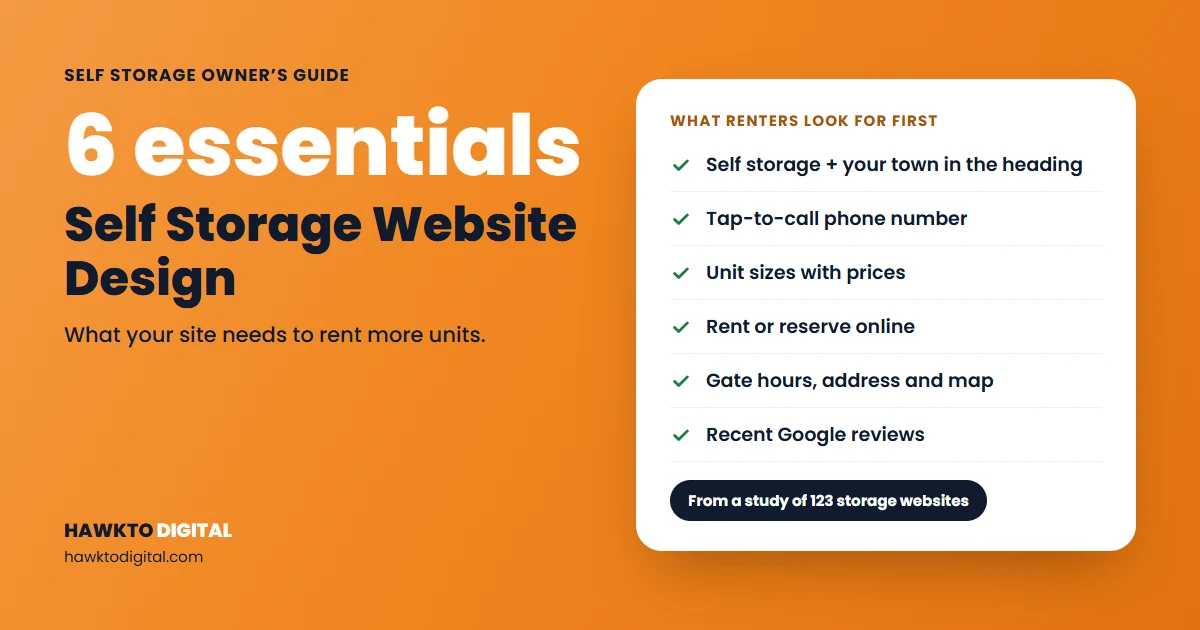
Good self storage website design answers a renter’s questions in seconds: what you are and where, how to call, which unit sizes you have and what they cost, how to rent or reserve online, your gate and office hours, your address and map, and what other renters say. Behind that sit fast mobile pages, one page per location, SelfStorage schema and well-described photos. In our study of 123 storage sites, 94% offered online renting, but 41% had no business schema and only 46% showed reviews on the homepage.
Self storage website design has one job: take someone who just searched for storage on their phone and turn them into a rental or a phone call with as little effort as possible. I handle Google Business Profiles, websites and social media for facilities managed by Joules Storage Management in Texas, so I spend a lot of time looking at where renters drop off and what gets them to call.
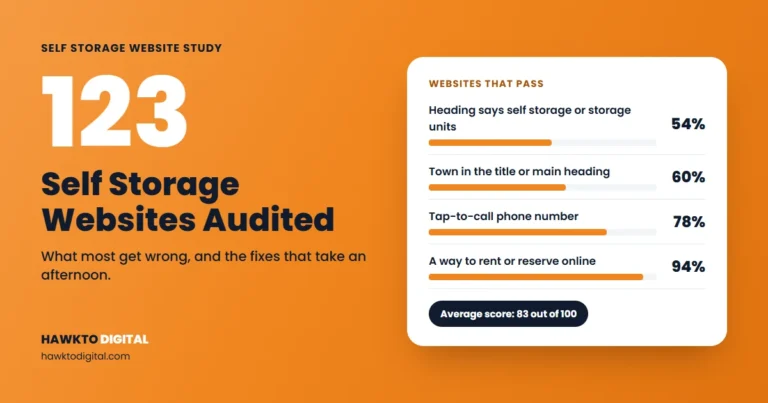
To see how the wider industry is doing, we audited 123 independent self storage websites in 14 US states on 19 checks. The average score was 83 out of 100, but the misses were on basics. The full results are in our self storage website study.
This guide covers what each part of a facility site needs, in the order renters use it. For a quick read on your own site first, run your homepage through the free self storage website audit tool.
In this guide
- What the best self storage websites have in common
- The 7 homepage essentials
- Unit and pricing pages
- Location pages for multi-site operators
- Mobile and speed
- SelfStorage schema
- Photos and alt text
- Accessibility basics
- Choosing a self storage website builder or platform
- How to measure your website’s results
- A one-hour self storage website design checklist
- Frequently asked questions
- Sources
For storage owners and managers
Want this done for your facility?
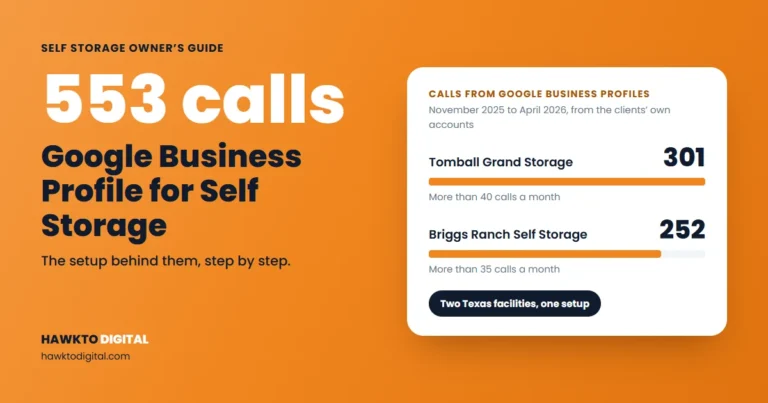
I market self storage facilities in Texas, including Briggs Ranch Self Storage, which got 252 calls from its Google Business Profile in 6 months. See how I can help with self storage marketing.
See self storage marketing servicesScore your facility website free
What the best self storage websites have in common
Renters arrive with a problem and a deadline: a move, a remodel, a business that’s run out of room. They want four answers fast. Do you have my size? What does it cost? When can I get in? How do I rent it today? The best self storage websites answer all four on the first screen of a phone and make one action obvious: rent, reserve or call.
Here’s where the 123 sites in our study stood on the checks that matter most:
| Check | What we found | What to do |
|---|---|---|
| Main heading | 54% had a main heading that says self storage or storage units | Use an H1 like “Self Storage Units in [Town], [State]” |
| Town | 60% named their town in the title or main heading | Put your town in both |
| Phone | 78% had a tap-to-call link; 16% showed a number that couldn’t be tapped | Make every phone number a tap-to-call link |
| Online rental | 94% had a rent or reserve online path | Test the whole flow on your phone |
| Reviews | 46% showed reviews on the homepage; 27% had none we could find anywhere | Show recent reviews and link to your Google profile |
| Schema | 41% had no business schema | Add SelfStorage schema to every location page |
Online renting was nearly universal in our sample, so having it won’t set you apart. The gaps are headings, phone links, reviews and schema, which are also the cheapest things to fix.
The 7 homepage essentials
For a single-site facility, the homepage often does the work of the whole site. Put these on it, most of them above the fold on a phone.
1. What and where, in the title and H1
Google builds the title in search results from sources including your title element, the main visual title on the page and heading elements such as the H1, and it asks for titles that are descriptive, concise and distinct on each page (Google Search Central). For example:
- Title tag: Self Storage in [Town], [State] | Climate-Controlled Units | [Facility Name]
- H1: Self Storage Units in [Town], [State]
A brand slogan can sit underneath. It shouldn’t be the H1.
2. Tap-to-call phone number
Put your number in the header as a tap-to-call link, and keep a call button visible as people scroll on mobile. Use the same number as your Google Business Profile so calls don’t scatter.
3. Unit sizes and prices
Show each size with dimensions, type (climate-controlled, drive-up, parking) and a current or “from” price. Add a line on what each size usually holds, in the words your managers use on the phone. State the terms next to any move-in special.
4. Rent or reserve online
Put a clearly labeled button next to each unit. “Rent now” and “Reserve” mean different things, so say which one it is and what happens next. Rent a unit yourself on your phone once a month to catch broken steps.
5. Gate and office hours
List them separately. Renters care most about when they can reach their stuff. Add holiday hours, and keep hours identical on your site and Google profile.
6. Address and map
Put your full address in the footer of every page with a map or directions link, plus one line using a landmark locals know, such as “behind [store] on [road]”.
7. Reviews
Show three to five recent reviews and link to your Google profile. Google says prominence in local results is partly based on how many reviews a business has, and that more reviews and positive ratings can help local ranking (Google Business Profile Help).
How does your homepage measure up?
Run it through the free audit tool and see which of these essentials it’s missing.
Unit and pricing pages
Unit pages close the deal for renters who know what they want, and they can rank for searches like “climate controlled storage [town]”.
- One page per unit type you offer: climate-controlled, drive-up, vehicle and boat parking, business storage.
- A size table with dimensions, access, features, price and a rent button on each row.
- Live prices: if rates change often, pull them from your management software so the site never shows an old price.
- Fees up front: admin fee, lock, and any protection or insurance requirement.
- Real photos and a short FAQ with what callers ask about that unit type.
Give each page its own title and H1, such as “Climate-Controlled Storage Units in [Town], [State]”.
Location pages for multi-site operators
Google asks each Business Profile to provide a website that represents your individual business location (Google Business Profile Help). If you run several facilities, give each its own page and link each profile to it. Each page needs:
- Name, address, tap-to-call number, gate and office hours
- That facility’s unit mix, prices and rent buttons
- Directions with local landmarks
- Photos and reviews of that facility only
- Its own SelfStorage schema
Keep each page specific. Google’s spam policies list “pages targeted at specific regions or cities that funnel users to one page” as doorway abuse (Google Search Central). Ten pages with only the town name swapped fit that description.
Mobile and speed
Google uses the mobile version of a site’s content for indexing and ranking, and says your mobile site should contain the same content as your desktop site (Google Search Central). If your mobile layout drops the unit table or reviews, Google may not see them.
Google’s Core Web Vitals set three targets (Google Search Central): Largest Contentful Paint within 2.5 seconds, Interaction to Next Paint under 200 milliseconds, and Cumulative Layout Shift under 0.1. Google says good Core Web Vitals align with what its core ranking systems seek to reward. Measure at the 75th percentile of real page loads, using PageSpeed Insights or the Core Web Vitals report in Search Console (web.dev).
The usual culprits on storage sites:
- Huge hero photos and sliders. Compress them and use one strong photo.
- Images without width and height set, which make the page jump.
- Rental widgets, chat and tracking scripts all loading at once.
- Pop-ups covering the call button on mobile.
SelfStorage schema
Schema.org has a dedicated SelfStorage type, “A self-storage facility,” which sits under LocalBusiness. Google says to use the most specific LocalBusiness subtype possible, requires name and address, and recommends geo, openingHoursSpecification, priceRange, telephone and url (Google Search Central). A starting point:
{
  "@context": "https://schema.org",
  "@type": "SelfStorage",
  "name": "[Facility Name]",
  "url": "https://[yourdomain].com/locations/[town]/",
  "telephone": "+1-[000]-[000]-[0000]",
  "priceRange": "$$",
  "address": {
    "@type": "PostalAddress",
    "streetAddress": "[Street]",
    "addressLocality": "[Town]",
    "addressRegion": "[State]",
    "postalCode": "[ZIP]"
  },
  "geo": { "@type": "GeoCoordinates", "latitude": [lat], "longitude": [lng] }
}
Add your opening hours with openingHoursSpecification. Google says to define each location as its own LocalBusiness, so multi-site operators need one block per location page. Match name, address, phone and hours to the page and your Google profile. And skip review stars: Google recommends review and aggregateRating markup only for sites that capture reviews about other local businesses.
Photos and alt text
Renters are trusting you with their belongings, so show real, recent photos: the gate keypad, office, hallways, a drive-up row, an open unit, cameras and lighting.
Google asks for useful, information-rich alt text in the context of the page, and warns that filling alt attributes with keywords may cause your site to be seen as spam (Google Search Central).
- Weak: alt=”storage units cheap storage near me storage [town]”
- Better: alt=”Drive-up 10×20 storage units with roll-up doors at [Facility Name] in [Town]”
Accessibility basics
An accessible site works for more renters, including older customers who are downsizing. Start here:
- Contrast: WCAG level AA asks for at least 4.5:1 for normal text and 3:1 for large text (W3C).
- Tap targets: WCAG 2.2 sets a minimum of 24 by 24 CSS pixels at level AA, with some exceptions (W3C). Make call and rent buttons well above that.
- Form labels: every field needs a visible label, not just placeholder text.
- Words, not only color: say “unavailable” instead of just greying a unit out.
- Keyboard: Tab through your homepage and rental flow. You should always see where you are.
Check your rental widget too. To the renter, it’s part of your site.
Choosing a self storage website builder or platform
Owners usually choose between a site from their management software provider or a storage-focused web company, WordPress or a general website builder with the rental widget embedded, or a custom build. Most storage management software offers an online rental widget, so judge each option on everything around it:
| Question | Why it matters |
|---|---|
| Do I own the domain and content? | You keep your pages if you switch |
| Can I edit titles, headings and schema? | Every fix in this guide depends on it |
| Does the rental flow stay on my domain? | Tracking rentals is easier |
| How fast are live examples on a phone? | Test them in PageSpeed Insights |
| Can I add unit and location pages? | You’ll outgrow a one-page template |
| Can I track rentals and calls? | Otherwise you can’t tell what the site earns |
Pick the option that gives you control over these at a price that works for you. If you’d rather hand off the build, see my website development service.
How to measure your website’s results
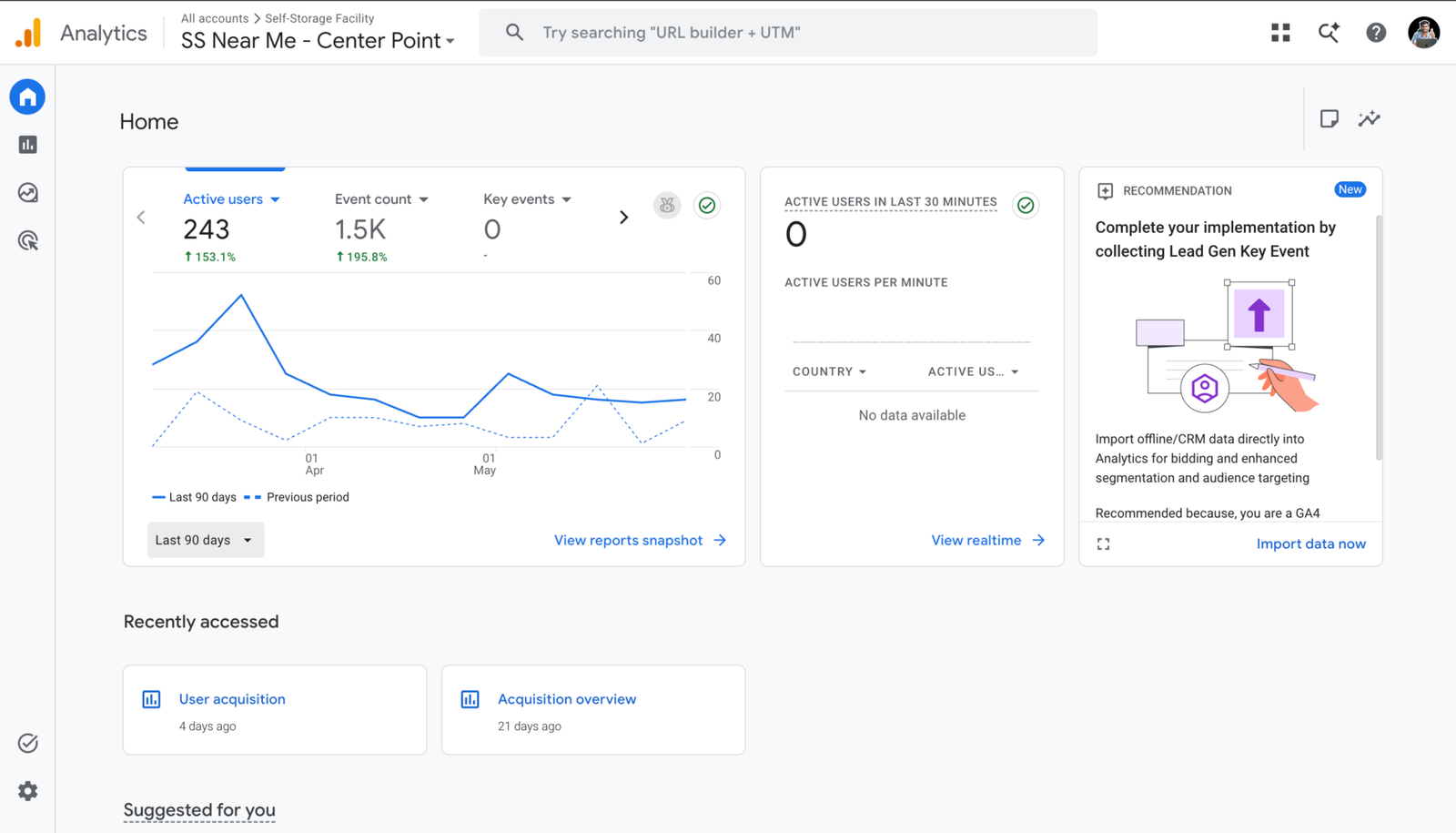
In Google Analytics, mark key events, which Google describes as a way to “measure actions that are important to your business” (Analytics Help). For a storage site, that’s rentals, reservations, phone taps and direction taps. Check the trend monthly. Here’s a self storage facility site I work on, with 243 active users over the last 90 days, up 153.1% on the previous 90 days:
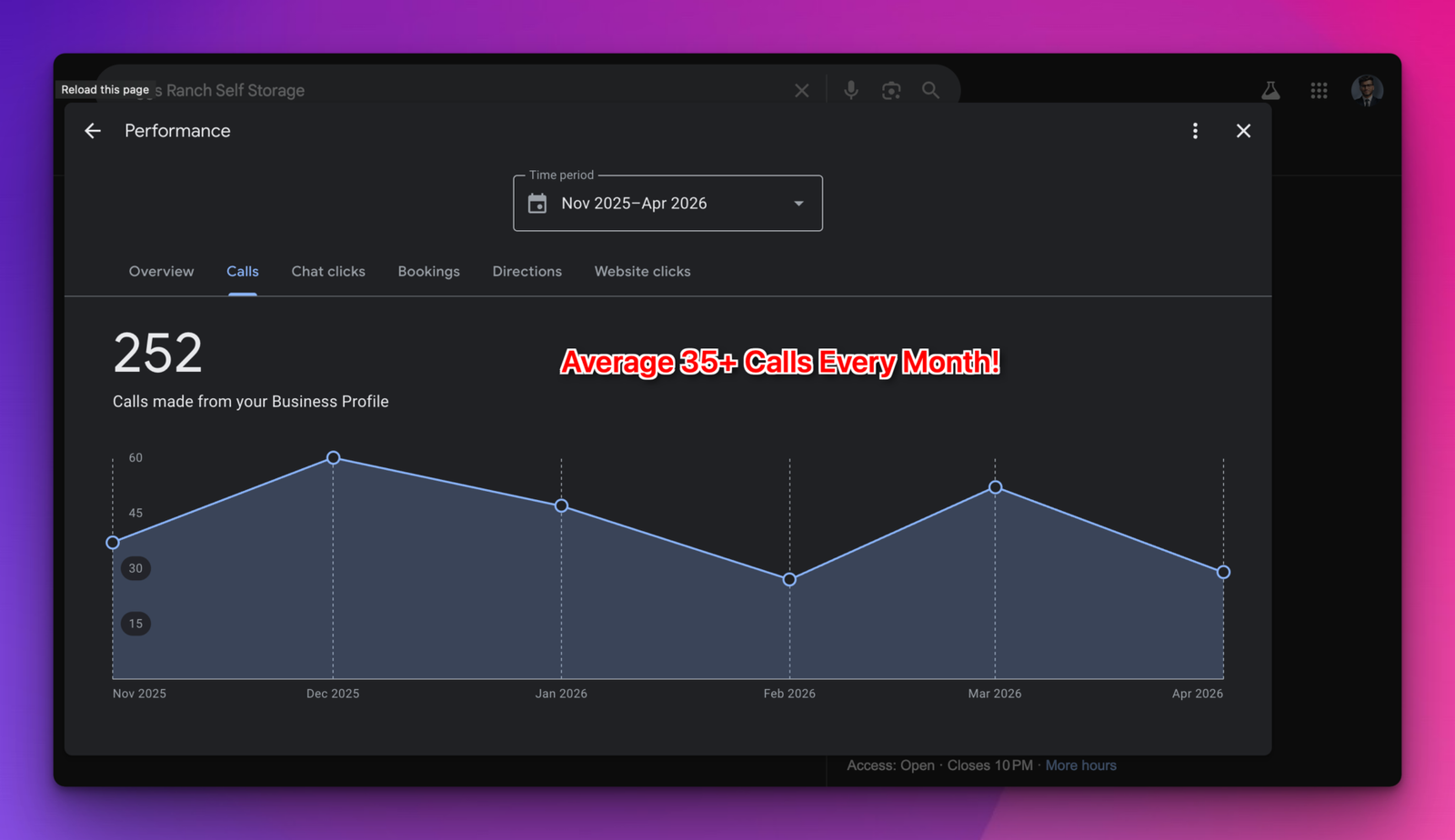
Your website works alongside your Google Business Profile. Searchers often find you on the profile and then visit the site to check sizes and prices. After a full Google Business Profile optimization, Briggs Ranch Self Storage in Texas got 252 calls from its profile between November 2025 and April 2026, an average of more than 35 a month:
Link the profile to the right location page, keep name, phone and hours identical, and watch website clicks next to calls in the profile’s performance report. My Google Business Profile guide for self storage covers the profile side, and the self storage SEO guide covers rankings and content.
A one-hour self storage website design checklist
Grab your phone and write down every “no”.
First 20 minutes: on your phone
- Does the H1 say self storage and your town?
- Does tapping your phone number start a call on every page?
- Are sizes and prices one tap from the homepage?
- Can you rent or reserve a unit start to finish?
- Are gate and office hours listed separately?
- Does the map link open your real location?
Next 20 minutes: your pages
- Search “self storage [your town]”. Does your title say what and where?
- Are recent reviews on the homepage, linked to your Google profile?
- Does each unit type have its own page with a size table and fees?
- Does each location have its own page with unique details?
- Are photos real and described in their alt text?
Last 20 minutes: behind the scenes
- Run your homepage through PageSpeed Insights.
- Check for SelfStorage schema.
- Compare name, address, phone and hours with your Google profile.
- Tab through the homepage with your keyboard.
- Confirm Analytics tracks rentals, reservations and phone taps.
Fix anything that blocks a rental or call first, then headings and titles, then reviews, schema and speed. For a second opinion, the free self storage SEO audit scores your homepage. For more ways to fill units, see my self storage marketing ideas.
Self storage website FAQ
Frequently asked questions
Answers to what facility owners ask most about their websites.
QWhat should a self storage website include?
A title and main heading that say self storage and your town, a tap-to-call number, unit sizes and prices, online renting or reserving, gate and office hours, your address and map, and recent reviews. Behind the scenes: fast mobile pages, SelfStorage schema and described photos.
QShould I show unit prices on my website?
Yes. Price is one of the first things renters want to know. If your rates change often, show them through your management software’s feed or widget so the site stays current.
QDo I need a separate page for each storage location?
Yes, if you run more than one facility. Give each page its own address, phone, hours, units, photos, reviews and schema, and link each Google Business Profile to its own page. Near-identical town pages can break Google’s spam policies.
QWhat schema should a self storage website use?
The SelfStorage type from schema.org, a subtype of LocalBusiness. Google requires name and address and recommends geo, opening hours, price range, telephone and url. Use one block per location.
QShould I use the website my storage software provides?
It can work. Choose whichever option lets you own your domain, edit titles, headings and schema, add location pages, load fast on phones and track rentals and calls. Test live example sites before you sign.
QHow can I check my own self storage website?
Work through the one-hour checklist in this guide on your phone, then run your homepage through the free self storage SEO audit tool.
Sources
Sources
Checked in November 2026.
- Google Search Central, Influencing your title links in search results
- Google Business Profile Help, Tips to improve your local ranking on Google
- Google Business Profile Help, Guidelines for representing your business on Google
- Google Search Central, Spam policies for Google web search
- Google Search Central, Mobile-first indexing best practices
- Google Search Central, Understanding Core Web Vitals and Google search results
- web.dev, Web Vitals
- Schema.org, SelfStorage
- Google Search Central, Local business (LocalBusiness) structured data
- Google Search Central, Image SEO best practices
- W3C, Understanding Success Criterion 1.4.3: Contrast (Minimum)
- W3C, Understanding Success Criterion 2.5.8: Target Size (Minimum)
- Analytics Help, Mark events as key events
Find out what your facility website is missing
See how your homepage scores on the basics renters and Google look for. If you want help with the fixes, I handle websites and Google profiles for storage facilities.
Score my facility websiteSee self storage marketing services

About the author
Mehedi Hasan is the founder of Hawkto Digital and is Google, HubSpot and Semrush certified. He markets self-storage facilities and RV parks for operators in the US, covering Google Business Profiles, local SEO, Google Ads, websites, social media and email. Read his story or see pricing.