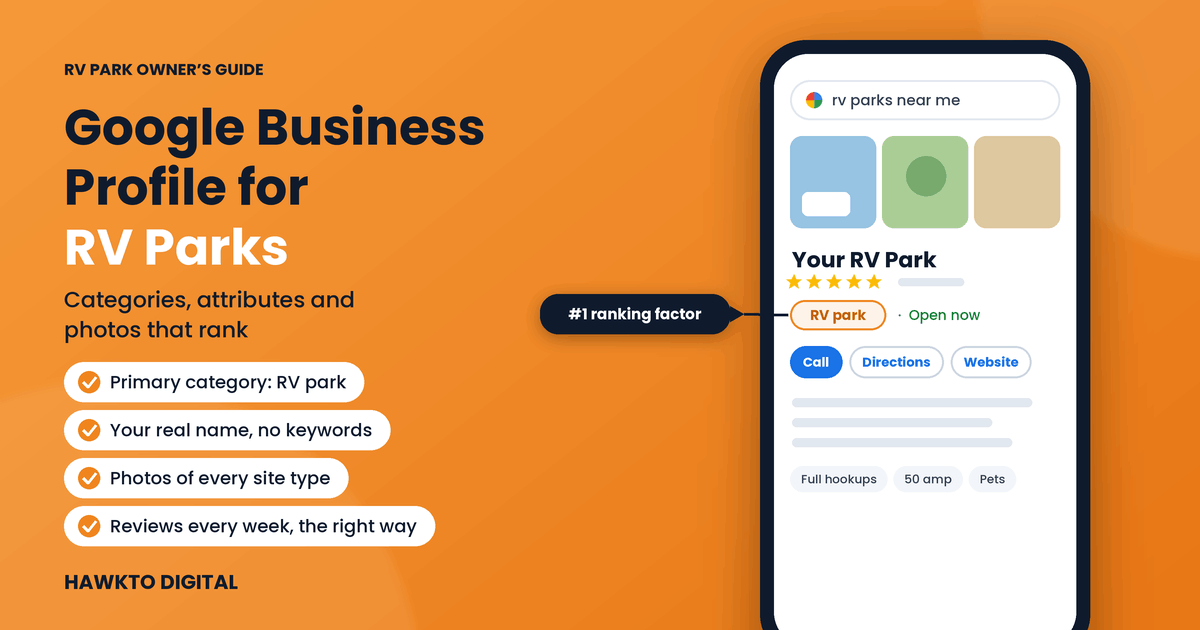
Google Business Profile for RV Parks: Categories, Attributes and Photos That Rank
Quick answer
To rank an RV park on Google Maps, set your primary Google Business Profile category to “RV park”, use your exact real-world name with no added keywords, and list honest hours that cover arrivals. Then fill in every attribute, write a 750-character description that answers RVers’ first questions, upload real photos of every site type and amenity, and send guests to a fast booking page. Keep it active with weekly reviews, personal replies and regular posts.
When a traveler searches “RV park near me”, Google shows three parks on a map before any website. Your Google Business Profile decides whether you’re one of them. Online search is now the top way campers discover campsites, used by nearly 64% of them according to the RMS 2026 State of the Outdoor Accommodation Report.
Most RV park profiles are half finished: the wrong category, old photos, no description and reviews from two years ago. That’s good news, because it means a complete, active profile can stand out quickly. I manage the Google Business Profile and local SEO for Country Home Estates, a long-term RV park in Oklahoma I’ve marketed since 2023. This guide to Google Business Profile for RV parks covers the 12 steps I use, checked against Google’s current rules so nothing you do puts your listing at risk.
In this guide
For RV park owners
Want this done for your park?
I have marketed a long-term RV park in Oklahoma since 2023: Google Maps, Google Ads, Facebook ads, the website and resident newsletters. See how I can help with RV park marketing.
What decides where your RV park shows on Google Maps
Google says local results are based mainly on relevance, distance and prominence: how well you match the search, how close you are, and how well known and trusted you are (Google Business Profile Help). Local SEO experts break that down further. These are the top five map ranking factors in Whitespark’s 2026 Local Search Ranking Factors survey:
| # | Ranking factor | What it means for your park |
|---|---|---|
| 1 | Primary category | Set it to RV park (step 3) |
| 2 | Distance from the searcher | You can’t move, so win on everything else |
| 3 | Keywords in the business name | Only your real name counts (step 2) |
| 4 | Physical address in the city searched | Use your exact street address (step 4) |
| 5 | Open at the time of search | Honest hours that cover arrivals (step 4) |
Reviews come next: a high Google rating ranks sixth and the number of reviews ninth. Distance is the one thing you can’t change, which is why everything else has to be right.
Prefer to watch? My 2026 walkthrough shows Google Business Profile optimization step by step, on a real profile:
12 steps to optimize your RV park’s Google Business Profile
Part 1 · Get the basics exactly right
1. Claim and verify one profile for your park
Search your park’s name on Google Maps. If a profile already exists, claim it instead of creating a new one, and verify it with the method Google offers you, often a short video showing your sign, entrance and office. Photos, edits and reviews don’t fully count until the profile is verified.
Keep one profile per park. Duplicate listings split your reviews and confuse Google about which one to show. If you find a duplicate, ask Google support to merge or remove it.
Check now: Search your park name on Google Maps and confirm there’s exactly one listing, verified and owned by you.
2. Use your real park name, and nothing else
Keywords in the business name are a strong ranking signal: “Keywords in GBP business title” ranks third in Whitespark’s 2026 Local Search Ranking Factors. That’s why so many parks are tempted to add “RV Park” or “Full Hookups” to their name.
Don’t. Google’s guidelines say your name must reflect your real-world business name, and adding marketing taglines, location information or other extra words isn’t permitted (Google’s guidelines). Listings that break this rule can be edited by Google or suspended. If “RV Park” is genuinely part of your name on your sign and paperwork, you get the benefit honestly. If it isn’t, earn your ranking with the next 11 steps instead.
Check now: Compare your Google name with the name on your entrance sign. They should match word for word.
3. Choose the right primary and secondary categories
Your primary category is the single most important local ranking factor: “Primary GBP Category” ranks first in Whitespark’s 2026 study (Whitespark). For most parks, the primary category should be RV park.
Google’s rule for categories is simple: choose the fewest that describe your core business, and use categories that complete the sentence “This business is a…”, not “This business has a…” (Google’s guidelines). Add a secondary category only when it’s genuinely true:
| Secondary category | Add it only if… |
|---|---|
| Campground | You also rent tent sites |
| Camping cabin | You rent cabins on the property |
| Mobile home park | You have mobile or manufactured home lots |
| RV storage facility | You store RVs as a separate service |
Never add a category for an amenity. A pool, a dog park or a laundry room is something your park has, so it belongs in attributes, photos and your description, not in your categories.
Check now: Open your profile, check your primary category says RV park, and remove any category your park only “has”.
4. Set accurate address, hours and holiday hours
Use your park’s exact street address, never a P.O. box. Google asks for your “regular customer-facing hours of operation” (Google’s guidelines), and “Business is open at time of search” is the fifth strongest local ranking factor in Whitespark’s 2026 study (Whitespark).
For an RV park, that raises a real question: are you open when the office is open, or whenever a guest can arrive? If you offer after-hours check-in with a night drop, gate code or self check-in, your listed hours can reflect that. If late arrivals can’t check in, list your office hours. Either way, add special hours for holidays and seasonal closures so travelers never drive to a closed gate.
Check now: Ask yourself: if a guest arrives at 11 pm, can they check in? Make your Google hours match the honest answer.
Part 2 · Show guests exactly what they’re getting
5. Fill in every attribute and detail that applies
Attributes are the checkboxes in your profile’s “More” section: things like Wi-Fi, accessibility, pets, payment options and amenities. The options depend on your category and change over time, so check them every few months and fill in everything that’s true.
They matter more than ever. Google’s AI answers in Maps now respond to questions like “Does this park take big rigs?” using your profile details, attributes, photos, reviews and website (Whitespark). The more complete your profile is, the better those answers will be.
Check now: Open the “More” section of your profile and fill in every attribute that’s true for your park.
6. Write a description that answers an RVer’s first questions
You get up to 750 characters. Use them to answer what RVers want to know before they call: where you are relative to the highway or attraction, what kind of sites you have, hookups and amps, big-rig access, pets, monthly stays and how to book. Write it for people, in plain sentences, and leave out links, prices and promotions.
Description template (swap the brackets)
[Park name] is a [big-rig friendly] RV park [2 miles off I-40 at Exit 123] in [Town, State], [10 minutes from Lake X]. We offer [pull-through and back-in] sites with full hookups and [30/50] amp power, [fast Wi-Fi], [a laundry room and clean bathhouses] and [a fenced dog park]. Stay for a night, a week or a month: [monthly sites are available with mail service]. Book online any time, or call us during office hours.
Keep it accurate. Everything in your description should match your website and your sign.
Check now: Read your current description out loud. Does it say where you are, your site types and your hookups in the first two sentences?
7. Upload photos and videos that sell the stay
Photos are where RVers decide whether your park looks like the place they want to wake up. Google’s requirements: JPG or PNG, between 10 KB and 5 MB, at least 250 × 250 pixels and ideally 720 × 720 or larger, sharp, well lit and without heavy filters. Videos can be up to 30 seconds and 75 MB, at 720p or higher (Google Business Profile Help).
Shoot what guests actually ask about:
| Photo | Why it matters |
|---|---|
| Entrance and sign | Helps guests recognize you when they arrive |
| Each site type with an RV parked | Shows space, surface, shade and access |
| Hookup pedestal | Answers the 30/50 amp question at a glance |
| Bathhouse and laundry | Cleanliness is one of the first things guests judge |
| Amenities in use | Pool, dog park, clubhouse, playground, waterfront |
| Aerial or drone shot | Shows the layout and setting in one image |
| Nearby attraction | Connects your park to the reason for the trip |
Add new photos every month. Fresh, real photos keep your profile current, and they replace the random guest photos that otherwise become your first impression.
Check now: Look at the first five photos on your profile as a guest would. Replace anything dark, old or confusing.
8. Send people straight to booking
Hotels can show prices and booking links on Google, but RV parks can’t: Google’s Hotel Center lists campgrounds and RV parks as outdoor lodging that is “not eligible on Google” (Google Hotel Center Help). Your profile still has a website link, so make it count:
- Link to the page that helps guests most, usually your home page or rates page, with live availability and a booking button one tap away.
- Make sure that page shows rates and works fast on a phone.
- Add tracking to the link (see the tracking section below) so you can see the bookings your profile sends.
Check now: Tap the Website button on your own profile from a phone. Count the taps it takes to see a price and book.
Want a second pair of eyes on your profile?
In a free 30-minute call I’ll review your Google Business Profile next to the top three parks near you and show you exactly what’s holding it back.
Part 3 · Keep it active and trusted
9. Get a steady flow of reviews, the right way
Recent reviews persuade guests and help your ranking. In BrightLocal’s 2026 Local Consumer Review Survey, 74% of consumers look for reviews written in the last three months, and 31% only use businesses rated 4.5 stars or higher.
Ask every guest, every time, by text or email a day or two after checkout, with a direct link to your review form. Stay inside Google’s rules: no rewards or discounts for reviews, no asking only happy guests (review gating), no reviews from staff or family, and never discourage negative reviews (Google’s fake engagement policy). Breaking them can get reviews removed or your profile restricted. My RV park review playbook has copy-paste request templates.
Check now: Count how many Google reviews you received in the last 90 days. If it’s fewer than one a week, set up an automatic review request.
10. Reply to every review personally
80% of consumers are more likely to use a business that replies to all of its reviews, but 50% are put off by generic, templated replies (BrightLocal 2026). Thank happy guests by name and mention something specific from their review. For a negative review, apologize for the experience, explain what you’ve fixed, and offer to talk offline. Future guests read your replies as closely as the reviews.
Check now: Reply to every unanswered review from the last 60 days, in your own words.
11. Post updates and offers every week or two
Google posts let you share events, offers and news directly on your profile. Use them for what changes: seasonal opening dates, event weekends, midweek offers, monthly site availability, new amenities. Each post needs a clear photo and one button, such as “Book” or “Learn more” pointing to the right page on your website.
Check now: Write one post this week about your next event or offer, with a real photo from your park.
12. Answer guests’ questions on your website
Google removed the Questions and Answers section from Business Profiles after announcing its deprecation in fall 2025. In its place, the Maps app offers AI-generated answers about a business, drawn from sources such as your profile details, photos, reviews, attributes and website (Whitespark).
So put the answers where Google can find them. Add an FAQ page to your website covering big-rig access, amps, pets, Wi-Fi, check-in times, monthly rates and cancellations, and when you ask for reviews, invite guests to mention the amenities they enjoyed.
Check now: List the 10 questions your office gets most often and make sure each one is answered on your website.
How to track what your profile brings in
Your profile’s Performance section shows calls, direction requests, website clicks and the searches people used to find you. Check it monthly and compare it with the same month last year.
To see what happens after the click, add UTM tags to your website link, for example ?utm_source=google&utm_medium=organic&utm_campaign=gbp at the end of your URL. Google Analytics will then show the visits and bookings that came from your profile, separately from the rest of Google.
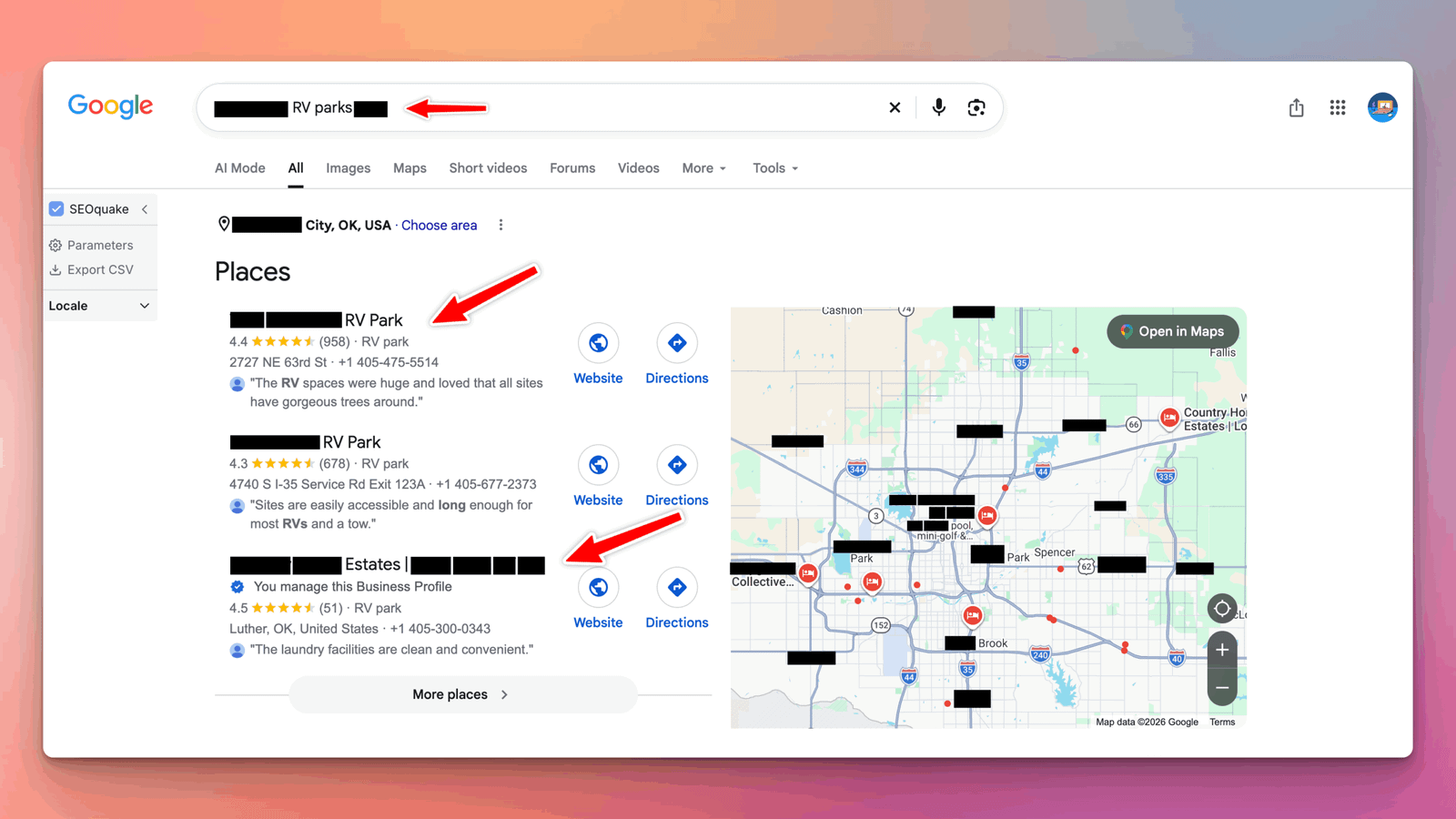
Tracking rankings matters too. Here are map pack rankings for an RV park I market, from its own tracking:
Google Business Profile checklist for RV parks
| Item | Done right looks like |
|---|---|
| Profile | One verified profile for the park, owned by you |
| Name | Exactly matches your sign, with no added keywords |
| Categories | Primary: RV park. Secondary only if true |
| Address and hours | Exact street address, honest hours, holiday hours set |
| Attributes | Every true option filled in, checked every few months |
| Description | Location, site types, hookups, pets, monthly stays, how to book |
| Photos | Every site type, hookups, bathhouse, amenities, aerial; new ones monthly |
| Website link | Fast page with rates and booking, tracked with UTM tags |
| Reviews | New reviews every week, asked of every guest |
| Replies | A personal reply to every review |
| Posts | An event, offer or update every week or two |
| Questions | Common questions answered on your website |
Mistakes that get RV park profiles suspended or ignored
- Stuffing keywords into the name. “Sunset RV Park – Full Hookups – Best Rates” breaks Google’s guidelines and can get your listing edited or suspended.
- Duplicate profiles. Two listings for one park split your reviews and your ranking.
- Using a P.O. box or office address. Your profile should show where guests actually arrive.
- Paying for reviews or asking only happy guests. Both break Google’s fake engagement policy.
- Claiming 24 hours when no one can check in. Travelers who arrive to a locked gate leave reviews about it.
- Stock photos. RVers can tell, and they want to see your real sites.
- Setting it and forgetting it. Old photos, no posts and no recent reviews make an active competitor look like the safer choice.
Keep reading
Related guides for park owners
Google Maps
How to Rank Higher on Google Maps
The full local ranking playbook for any local business.
Occupancy
How to Increase RV Park Occupancy
15 ways to fill weeknights, gap nights and slow seasons.
RV park Google Business Profile FAQ
Frequently asked questions
Answers to what park owners ask most about their Google profile.
QWhat Google Business Profile category should an RV park use?
For most parks, RV park should be the primary category. Add secondary categories only when they’re true for your business as a whole, such as Campground if you rent tent sites or Mobile home park if you have mobile home lots. Don’t use categories for amenities like a pool.
QCan I add “RV park” or keywords to my Google business name?
Only if they’re part of your real-world name on your sign and paperwork. Google’s guidelines don’t allow extra keywords, taglines or location information in the business name, and profiles that break this rule can be edited or suspended.
QShould my RV park be listed as open 24 hours on Google?
List the hours when guests can actually arrive and be served. If you offer after-hours or self check-in, listing 24 hours can be accurate. If late arrivals can’t check in, list your office hours, and always add holiday and seasonal hours.
QCan my RV park get a Book button or prices on Google?
Not through Google’s hotel booking features: Google’s Hotel Center lists campgrounds and RV parks as outdoor lodging that isn’t eligible. Use your profile’s website link to send guests to a fast page with live availability and online booking.
QHow many photos should an RV park have on Google?
There’s no official number. Cover every site type, your hookups, bathhouse and laundry, amenities, entrance and an aerial view, then add a few new photos every month so your profile always looks current.
QWhat happened to Questions and Answers on Google Business Profile?
Google removed it after announcing its deprecation in fall 2025. The Maps app now shows AI-generated answers based on your profile, photos, reviews, attributes and website, so answer common questions on your website and keep your profile complete.
QHow long does it take to rank higher on Google Maps?
Fixes like the right category, accurate hours and a complete profile can help within weeks. Building reviews, photos and links that move you into the top three usually takes three to six months, depending on your competition.
QCan you optimize my RV park’s Google Business Profile?
Yes. Google Business Profile optimization is included in my SEO plans from $300 a month. See my Google Business Profile optimization service or the pricing page.
Sources
Sources
Checked in October 2026. Google changes Business Profile features often, so check the latest options in your own profile.
- Whitespark, Local Search Ranking Factors 2026
- Google Business Profile Help, Tips to improve your local ranking on Google
- Google Business Profile Help, Guidelines for representing your business on Google
- Google Business Profile Help, Photo and video guidelines
- Google Maps user-generated content policy, Fake engagement
- Google Hotel Center Help, Property types
- Whitespark, With Google Q&A Gone, You Need a Maps “Ask a Question” Strategy
- PinMeTo, BrightLocal Local Consumer Review Survey 2026
- RMS, 2026 State of the Outdoor Accommodation Report (via Hospitality Net)
Get your park into the Google Maps top three
Book a free 30-minute call. I’ll compare your Google Business Profile with the top three parks near you and send you a written list of fixes, whether you hire me or not.
Book my free profile reviewSee Google Business Profile optimization

About the author
Mehedi Hasan is the founder of Hawkto Digital and is Google, HubSpot and Semrush certified. He has managed the Google Business Profile, local SEO, Google Ads and Meta ads for a long-term RV park in Oklahoma since 2023, and Google profiles for local businesses across the US. Read his story or see pricing.